





Power Automate as the link between Business Processes and Fabric
Power Automate Microsoft Fabric integration is often overlooked when organizations invest in platforms like Microsoft Fabric. The focus usually goes straight to analytics and AI, while the connection to day-to-day business processes is missing.
Most business value does not come from complex models right away. It comes from automating repetitive, rule-based processes that already exist. Approvals, validations, document generation and simulations usually follow clear logic. They do not need AI, they need consistency.
This is where Power Automate plays a key role. It acts as the operational layer between users, business tools and Fabric. Without it, many data platform solutions remain isolated instead of becoming part of daily operations.
Automate what is already clear
Before introducing AI, there is often a large opportunity in automating what is already well understood. Power Automate allows you to create structured workflows that respond to events, validate inputs and move data across systems.
Power Automate is also an accessible starting point for automation. Compared to building custom software, it requires relatively low investment and can be implemented quickly using tools that are often already part of the Microsoft ecosystem. This lowers the barrier to start automating without committing to large development efforts upfront.
The result is not just efficiency. It creates reliable, repeatable processes that form a solid foundation for more advanced use cases later on.
Three practical examples we used Power Automate
1. Excel Online as a lightweight software MVP
A practical way to validate ideas quickly is by combining Excel Online with Power Automate.
Users can trigger flows directly from Excel using buttons, while the Power Automate flow connects to systems like SQL Server. Because Excel is flexible and cell-based, logic and inputs can be adjusted quickly without rebuilding the solution.
This approach works well in early development stages where user requirements change frequently and speed matters more than perfect architecture.
2. Structured process automation with Forms and PDF output
User input can be captured through a form, after which a Power Automate flow is triggered to process that data. The input is validated, used in calculations and transformed into a structured output.
A common pattern is:
-
- Input via Microsoft Forms
-
- Validation and calculation logic in Excel
-
- Output as a generated PDF
-
- Automatic email to the respondent including PDF as output.
Power Automate orchestrates the entire flow. What used to be separate manual steps becomes one consistent process. It reduces errors, improves traceability and saves time with minimal complexity. Practical examples of this flow are:
-
- Pricing calculations of offers
-
- Employee onboarding requests
-
- Investment or project approval requests
-
- Budget request or cost approval
-
- Contract or document generation
3. Power BI as an interaction layer
Power BI is mainly used for reporting but, with Power Automate, it becomes interactive.
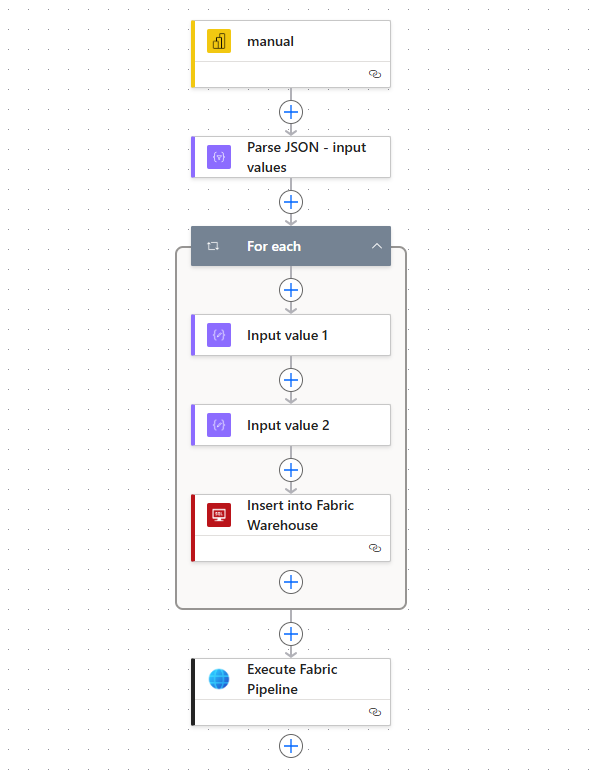
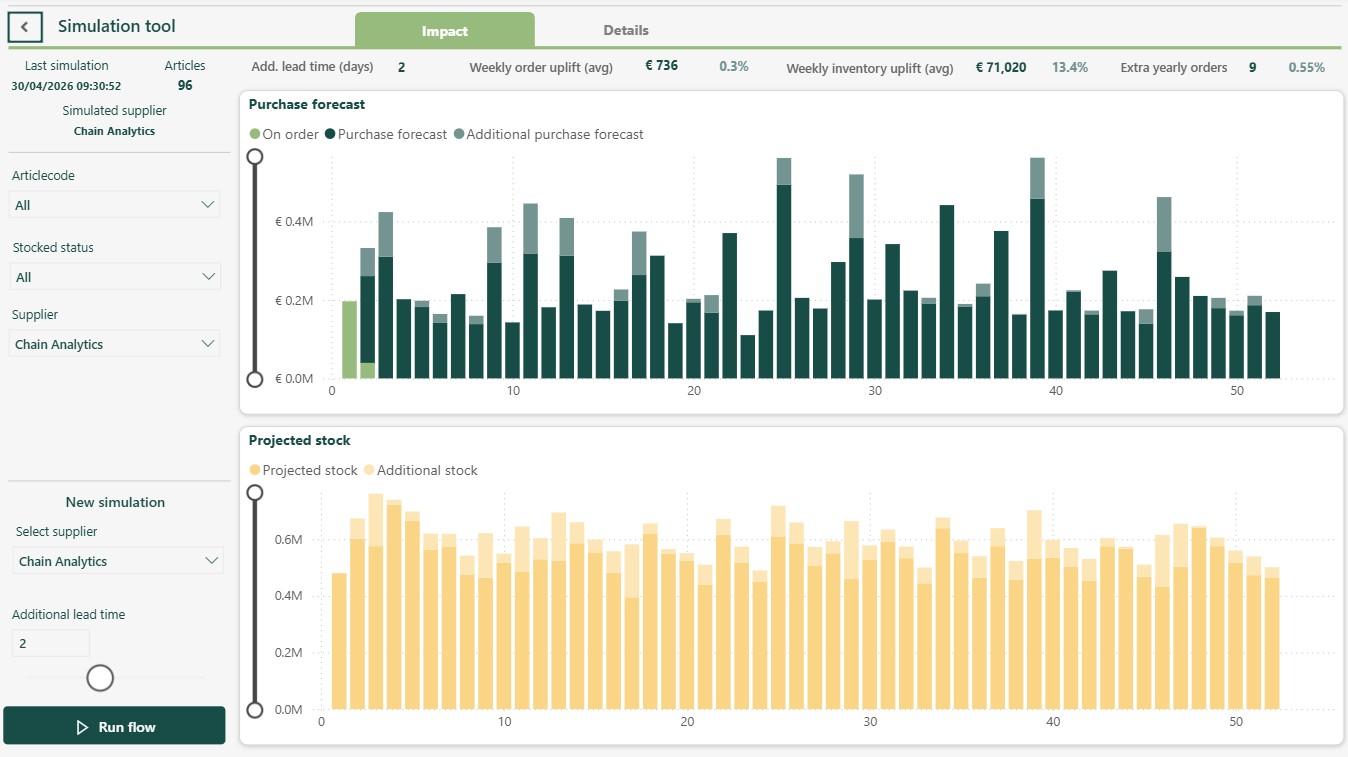
Buttons in reports can trigger a flow that capture user input from a parameter. The flow makes sure it writes data to Fabric with an SQL connection, followed by a pipeline run that includes a notebook and semantic model refreshes. This creates a closed loop where users influence the data and see the results directly in the same Power BI report.
Key takeaway
Power Automate is often underestimated. It is not just a workflow tool, but the connection between how a business operates and how its data platform is used.
AI will continue to grow in importance. But in many cases, the fastest impact comes from automating what is already clear. Power Automate helps make that step practical and ensures Fabric becomes part of real business processes, not just a technical solution.
In practice, we use Power Automate regularly at our customers and combine it with monitoring through Microsoft Teams and Outlook integrations. This allows us to receive immediate alerts when a flow is interrupted, ensuring issues are detected and resolved quickly.
👉 Like this post on LinkedIn
Author: Maarten Bontes (Product Manager & Data Engineer @Chain Analytics)